


This Twitter application written in Java works with almost all the phones that are available today. The simplest way to install is to open your Java-enabled phone’s web (or WAP) browser and type the following URL: tw.j1ck.com
Features:
- All standard functionality: timeline, @mentions, DMs, favorites, following/followers, follow/unfollow, profiles… and of course tweeting!
- Simple, no-nonsense interface. Up/Down/Click and using a menu is all you need to know.
- Quick Reply / Retweet / Favorite in each tweet
- Trending Topics / Saved searches support
- Multiple-account support.
- Twitpic support: you’ll see the picture without having to navigate over there
- Camera support! Take a snapshot from the tweeting form itself and have it automatically uploaded to Twitpic. Great to share where you are in a moment.
- Pretty good support for touch-screen phones (we’re testing mainly on Nokia 5800 and Samsung F480)
- Support for QWERTY keyboard phones (Nokia E71 is currently our main testing device for this)
Here is an (incomplete) list of phones that this application works with
Nokia N70, Nokia N73, Nokia N80, Nokia N81, Nokia N95, Nokia E50, Nokia 6230, Nokia 6288, Nokia 6500, Nokia 5610 XpressMusic, Nokia 5220 XpressMusic, Nokia 2630, Nokia 3109c, Nokia 3120 Classic, Nokia 5800, Sony-Ericssson W880i, Sony-Ericssson K610i, Sony-Ericssson Z610i, Sony-Ericssson K800i, Samsung SGH-U700, Samsung SGH-J800, Samsung SGH-i560, Samsung SGH-L760, Samsung SGH-F480 (touch-screen), LG KU-380, LG KU-800, Motorola RAZR V3, Motorola VE 538
[Thx Daniel, Via]
Latest Qik update makes sharing more personal on Nokia S60 and Samsung Omnia HD phones

For all the Nokia and Symbian Qikkers out there – The folks at Qik have an update of the Qik client for Nokia Series 60 3rd edition, Nokia Series 60 5th edition touch phones and Samsung Omnia HD i890. This Symbian client update (version 1.0.14) enables you to sign-up/sign-in using Facebook Connect and share your videos directly to your contacts on the phone with a cool, new Speed Sharing Ribbon(TM). You can download this update from d.qik.com on your phone.
 Nokia Ovi Maps has received an update. Including with bug fixes and few improvements are several new features. Visited somewhere beautiful? Enjoyed a meal in a nice restaurant? Enhanced your cultural life with a visit to a new exhibition? You can now share these by creating a “favourite place” and sharing this within your Ovi maps. To update head on over to maps.ovi.com

The folks at said that their version of the Google Reader application (RSS / feed) for Symbian is soon going to be available for the public. If you want to get more info about the release date etc, follow them on
gReader supports the following devices:
- Nokia 3250, 5320, 5500, 5530, 5700, 5800, 6110, 6120, 6121, 6210, 6220, 6290, 6650, E50, E51, E60, E61, E61i, E62, E63, E65, E66, E70, E71, E75, E90, N71, N73, N76, N77, N78, N80, N81, N82, N91, N92, N93, N95, N95 8GB, N96, N97, N97 Mini and X6.
- SonyEricsson Satio

The OVI Mail just got updated by the folks at Nokia Beta Labs. Grab it from here
Many of you have asked for S60 setup support for Ovi Mail and we’re happy to introduce it today. We just made the “Ovi Mail Setup” application available in Beta Labs for a wide range of S60 devices (see Download and Installation for supported devices).
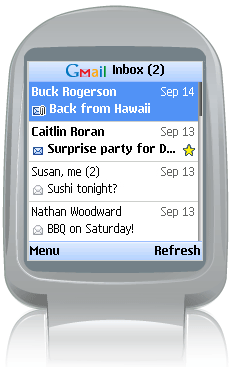
New version of google gmail mobile is out. To download it, direct your phone to http://www.gmail.com/app


Now this is a useful application for your N-Series Symbian Phone, you’ll never know when youll need it… Download it from here.

Now this is what i call a real full screen clock  The applications name is mClock and it can be downloaded from here


“Nokia Team Suite is now available for free for S60 3rd Edition devices through Nokia Catalogs.
“Team Suite, is a new group collaboration software that is very useful. Team Suite helps organize and facilitate conference calls, initiate push-to-talk sessions with selected team members through a built-in speakerphone.”
Applications available through Nokia Catalogs seem to be limited to region, so perhaps not everyone could access it.”
Download it to PC from here
[Source: MR forum]

Download it from here
Overview
Nokia Device Status is a self-diagnosis tool that allows you to collect detailed system information both from your PC and your S60 device. Your current device configuration and phone settings are presented in a detailed summary, which you can use to determine the exact cause, if you run into problems.
With Nokia Device Status, you can save all the collected information to a file, and you can send the file to customer care services for closer inspection and analysis.
Collected data from your PC includes:
- Operating system
- Language of the operating system vs. that of Nokia PC Suite
- Version of Nokia PC Suite currently installed on your PC
- Drivers required to connect your phone to your PC
- Local time zone
- Log files created by Nokia PC Suite
- Regional and language settings
Collected data from your phone includes:
- Device model
- IMEI code of the phone
- Device memory and any available memory card
- Profiles and themes used on the phone
- Locations used to store data on the phone
After installation, you can access the application both from your phone and from your PC.


Loving that song? Midomi TrackID (music search) is the fastest way to find and explore music. For a limited time, Midomi is offering a free trial. Just tap the orange button and sing, hum or hold your phone up to a speaker – and Midomi names the tune!
Features:
- Just hold your phone up to a speaker, and Midomi names the tune in as little as five seconds!
- It even works if you sing or hum the melody.
- You can share a song on Twitter or Facebook, buy it, or check out lyrics, videos, and artist info for free.
Download Midomi Track ID from our forums s60v5 application section
Take also a look at the Shazam Track ID application
Trend Micro Mobile Security v3.0:
The integrated solution provides automatic, real-time scanning to protect wireless devices against malicious code and viruses on the Web or hidden inside files in combination with a packet-filtering firewall.
As the number of data-centric mobile devices grows, industry analysts such as Gartner and Meta Group expect them to become an attractive target for virus writers. Mobile Security provides protection against emerging threats via a compact yet sophisticated scan engine that helps detect and block malicious code.
NEW FEATURES:
This release of TMMS support for Symbian OS/S60 3rd Edition adds usability improvements as well as a firewall and intrusion detection to the previous releases of TMMS.
GETPROTECTED!
One of the drawbacks that i see from getting your hands on one of these is that they seriously slow down your phone, and in the case of the already tight strapped RAM of the n95 – it’ll be Hell for the user !Moreover there aren’t many viruses around for the s60 v3 phones as yet, so you can just keep the sisx file on your phone incase of an emergency.But the firewall and intusion detection are certainly things that we can’t live without – especially in today’s world of digital espionage and theft…cyber theives can ruin your life with touch of a button !! Scary isn’t it?Others to check out are:
NetQin Anti-Virus Pro v2.2.40
Jiangmin Antivirus [beta]


New version of Resco Photo Viewer is out. Resco Photo Viewer is a image application for Symbian S60 that in my opinion is way better than the built in application on S60. Read my review here download the demo here
New in V4.50
- Certified by Symbian signed
- Improved TIFF/FAX support
- Support for JPEG2000 file extensions
- More slideshow durations (up to 5 minutes)
- Add image to contact
- Improved support for Nokia E90
- Improved quality of zoomed out images
- Info about currently displayed image
- Optional ask before exiting application


Andrew Currie has written an review were he compares the two most popular taskman applications for symbian S60. I personally prefer the best taskman due to the shortcut function.

In this video Mark previews the popular mobile browser Opera Mini 5 Beta that got launched today. You can download the new beta from here.
[Via]
Opera Mini 5 Beta Released – Gets new UI, Copy and paste, tabs and password manager


The new Opera Mini 5 beta finally got released today with some really nice features. Check them out after the break…
Top new features
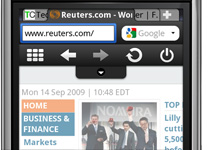
Tabbed browsing
Browse several Web sites at the same time. Jump easily from one to another.
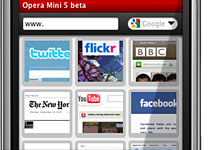
Speed dial
Your favourite sites are just one click away.

Touch & Keypad
The interface optimizes the display for both touchscreen and keypad phones.
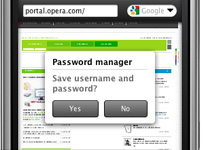
Password manager
Log on to your email, social network and other sites with just one click.
Popular features
Innovative and Easy-to-use
Living up to our vision of providing the best Internet experience on any device, Opera Mini 5 boasts a powerful new user interface. Merging the best from our desktop browser together with new innovations for mobile phones, Opera Mini is advanced, yet highly intuitive to use.
Tabs
With tabbed browsing you no longer need to interrupt one session to start another. Use your web-mail in one window, Facebook in another, Twitter in a third and all that while checking the latest sports results. With Opera Mini you can easily identify the different tabs and jump between them.
Password manager
No more hassle with those hard to enter user names and passwords. Opera Mini 5 will remember your credentials and you can log on to your favorite Web sites with just a single click. The passwords are stored on your phone for your convenience.
Full Web in your palm
When visiting a Web page, Opera Mini displays the overview of the page and suggests where to begin your reading before you zoom in. Opera Mini also detects when on a Web page designed for a mobile phone and displays it optimally.
Touch & Keypad
The user interface has been designed for both touchscreen and keypad style mobile phones. With a touchscreen you can enjoy even easier navigation with our new zooming and kinetic scrolling.
Speed Dial
Get your favorite Web page with just one click. Speed Dial is a set of visual bookmarks you see when you open a new tab, like a dashboard for your on-line life. To add a new page, simply click on an empty Speed Dial slot, and Opera will make suggestions based on your browsing history and bookmarks.
Built for speed
Time is precious. Opera Mini compresses pages by up to 90% before being sent to your phone meaning faster page load times than in other mobile Web browsers.
Find things faster
The new Opera Mini lets you search for text within a Web page so you can get to the information you need even quicker than before.
Power scrolling
Scroll at warp speed using your phone keypad or by dragging the page on a phone with a touch screen.


